Scanner Radio - Police Scanner
GordonEdwards.net LLCNews & Magazines
4.866.51K Reviews
- Version
- 8.30
- Installs
- 10.00M
- Age Rating
- Everyone
Screenshots
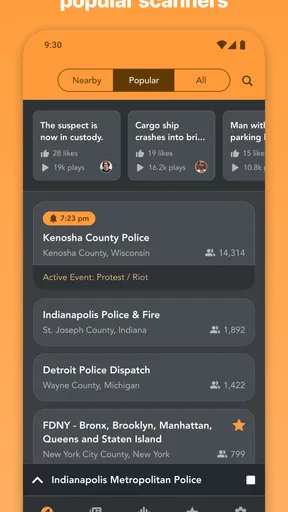
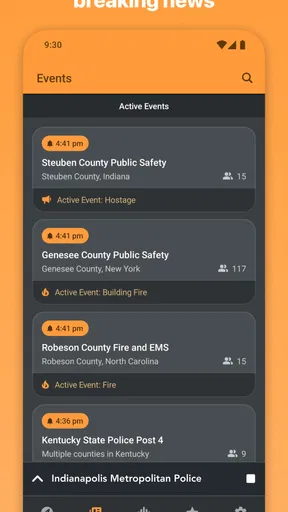
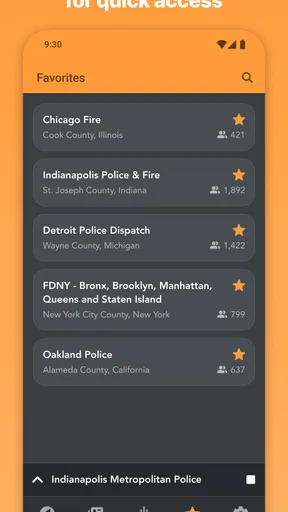
Our Review of Scanner Radio - Police Scanner
 Analysis by Appyee
I usually reach for a news app when I want a quick written account of what is happening nearby. Scanner Radio - Police Scanner gives me a different kind of starting point: I can listen to public-safety radio feeds and hear activity unfold as it is being reported. That makes it compelling when a story is moving quickly, but it also asks more of me than reading a headline. Radio traffic can be incomplete, technical, and hard to interpret without context, so I treat it as a way to follow activity rather than as a finished news report.
Diving into the Features
The first thing you’ll notice when you fire up Scanner Radio - Police Scanner is the user-friendly interface. It’s super straightforward, which means you don’t have to be tech-savvy to navigate it. Just a few taps, and you’re listening to live feeds from around the globe.
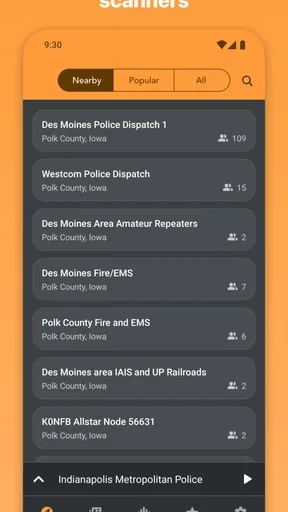
One of my favorite features is the ability to browse by location. You can easily jump from your local county’s radio to listening in on emergency services halfway across the world. Pretty neat, right? Plus, the app lets you save your favorite channels, making it a breeze to revisit them whenever you want.
That location-first approach is useful because a broad scanner directory can otherwise feel like a wall of unfamiliar names. I’d start with a nearby area, listen long enough to understand the pace and vocabulary, and only then branch out to another place. A county feed and a city feed may cover different activity, so saving a few channels that serve different purposes can be more practical than bookmarking a long list just because it looks interesting.
Favorites also change the app from a one-off curiosity into a repeatable routine. I can keep a local feed close at hand, then switch to a separate area when I’m following a major event elsewhere. The trade-off is that a favorite is only a shortcut, not an explanation of what is happening. Before drawing conclusions from a short exchange, I would listen for more context or check a reliable news source for a confirmed account.
For a realistic everyday example, imagine hearing sirens in the distance while you are at home and wondering whether there is an incident nearby. I could open the app, choose a relevant local feed, and listen for a while rather than guessing from the sound alone. If the radio traffic is busy or unclear, I would stop there and look for a local public update instead of treating a fragment of conversation as proof. The useful outcome is better situational awareness, not a license to investigate or get in the way.
That distinction matters even more when driving, walking near an incident, or caring for someone who needs your attention. Listening takes focus, and the app is not a substitute for emergency services, official instructions, or direct help. I would never use it to approach an active scene, share identifying details about people involved, or make decisions about personal safety based only on a broadcast. It works best as a passive source of information used from a safe distance.
Customization Galore
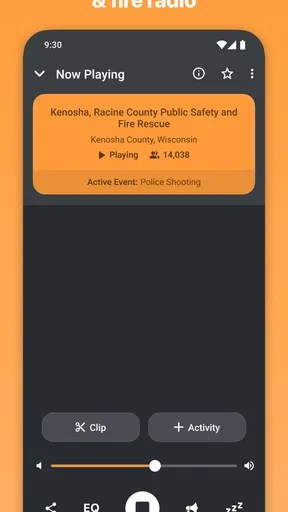
Now, let’s talk about customization. The app isn’t just about listening; it’s about tailoring the experience. You can set alerts for when a channel has over a certain number of listeners, which usually means something big is happening. This feature is like having a news alert system right in your pocket.
I see listener-count alerts as a clue to pay attention, not a reliable measure of importance. A channel can attract listeners for reasons that are not obvious from the number alone, and a busy feed does not tell me whether an event is close to home or relevant to me. A useful setup is to choose an alert threshold that is selective enough to avoid constant interruptions, then open the channel and judge the situation for yourself. If every spike pulls you into an unrelated feed, the alert stops helping.
It is also worth deciding in advance what an alert should prompt you to do. For me, it would be a reminder to check the feed and then verify any consequential information elsewhere, not a signal to rush out or spread a rumor. That small rule keeps an attention-grabbing feature in its proper place. Anyone who finds live incidents stressful may prefer to leave alerts off and browse only when they deliberately want to listen.
And get this: you can even choose different themes for the app. Whether you like it dark and moody or bright and cheerful, Scanner Radio has got you covered.
The theme choice is a small comfort feature, but it is still useful during longer listening sessions or when I open the app in a dim room. More important than appearance is keeping the listening task simple: choose a channel, give it a little time, and leave when the feed is no longer useful. I would avoid treating background audio as a constant stream of entertainment. These are real-world communications, and stepping away is reasonable when the content feels upsetting or difficult to follow.
People often ask whether they need specialist radio knowledge to get value from a scanner app. I don’t think so: the location browsing and straightforward controls make it approachable for a curious listener. But basic patience helps. Dispatch traffic may use abbreviations, refer to landmarks you do not know, or move between updates without explaining the whole story. If I miss a phrase, I don’t fill in the gaps with a guess; I wait for more context or switch to a written report.
Another practical question is whether it is useful outside your own area. It can be, especially if you want to listen to feeds from other places, but distance makes interpretation harder. Local street names, agency terminology, and the sequence of events are easier to understand when you know the community. For a faraway breaking story, I would use a scanner feed as a glimpse into radio activity and rely on established reporting for the broader explanation.
Real-Time Action
If you’re a fan of staying in the loop with what’s happening live, this app is a goldmine. You get to hear events unfold in real-time, from local emergencies to major incidents across the globe. It’s like having a front-row seat to the world’s most dynamic news source.
In practice, the “live” quality is both the strongest draw and a reason to be cautious. A feed can give me the order and urgency of radio exchanges, but a few minutes of audio rarely provides the complete picture. Information can change as responders learn more, and an early description may not match a later account. I would not repeat an unverified detail as fact, especially if it concerns a person, a location, or a developing emergency.
For someone who follows storms or other local disruptions, a radio feed may add texture to the experience of monitoring events. It can help explain why activity seems heightened, but it should sit alongside dependable weather information and official local guidance. It is not a forecast, a warning system I would rely on for personal protection, or a replacement for alerts intended to tell residents what action to take.
The same caution applies to traffic and road closures. Hearing responders discuss a situation might make me curious about a route, but I would use a navigation service or official traffic notice to decide where to drive. Radio traffic is intended for operational communication, not tailored directions for listeners. The safe workflow is to listen from elsewhere, verify through a suitable public source, and avoid turning toward an incident to see what is happening.
There is also a handoff from the app to other sources that makes the experience more useful. When something sounds significant, I can note the general area and type of activity, then look for an official notice or a credible news report. If those sources do not confirm it, I leave the detail unresolved rather than filling the gap. That approach takes longer than reacting to a dramatic snippet, but it produces a much more trustworthy understanding.
Compared with conventional news apps, this one gives me rawer material and less explanation. News articles are better when I want a summary, confirmation, names checked by editors, and a clear account of what is known. Scanner listening is better when I want to hear the cadence of unfolding radio activity and am comfortable making sense of fragments. The two are not interchangeable: I would use the scanner to follow the flow and written news to understand the outcome.
It differs from a general audio or radio app, too. Those are usually built around selected programs, music, or a planned listening experience; this is for people who want to browse feeds tied to public-safety activity. That focus is interesting but not always relaxing. If I want an easy background listen or a polished explanation, I would choose a podcast, a news bulletin, or another audio source instead.
The app is published by GordonEdwards.net LLC and sits in the News & Magazines category. It is free to install, with in-app purchases listed from $2.99 to $39.99 per item, so I would check the purchase details shown in the app before buying anything. Its audience rating is Everyone, but that label does not mean every broadcast will be comfortable for every listener. Emergency communications can include distressing situations, and parents may still want to decide whether the content suits a child.
Its long-running presence is reflected in a release date of April 25, 2010, while version 8.19 is the current version noted for the app. It has a 4.8 average from around 477,000 ratings and more than 10 million installs, which suggests that a large audience has found a reason to keep it around. I treat that popularity as useful context, not a guarantee that every feed will be clear, relevant, or available in the way I expect.
If you are deciding whether to try it, the key question is what you want from local information. A curious listener, a person who follows public-safety activity as a hobby, or someone who wants to explore feeds from different places may enjoy the direct access. Someone looking for verified headlines, detailed explanations, or clear instructions during an emergency is better served by established reporting and official alert channels. I would install it for listening, not make it my only source of news.
One small workflow tip is to keep your listening purposeful. Pick the area you care about, decide what you hope to learn, and set a natural stopping point instead of leaving a feed on indefinitely. If the traffic becomes difficult to understand, move to a more useful source rather than spending an hour trying to decode every exchange. This avoids turning a handy window into a stream of noise and makes it easier to separate a passing curiosity from information that truly affects your day.
Another trade-off is emotional distance. Hearing a voice describe an urgent situation can feel more immediate than reading a short article, but the added immediacy does not necessarily add context. I would be especially careful about listening for entertainment during a serious local event. If a broadcast raises concern, the considerate response is to stay clear, avoid spreading details that have not been confirmed, and follow guidance from the relevant public authorities.
Some readers will wonder whether this can replace local alerts. I would not use it that way. A scanner feed may be interesting when activity is already underway, but it is not the same as a targeted notification that tells you what action to take. Keep the alert methods you already rely on for safety, and think of scanner listening as optional context. Likewise, if you need a concise account after an event, a news report is a better endpoint than trying to reconstruct the whole story from radio traffic.
Another question is whether the app is worthwhile if you only want to listen occasionally. I think it can be, because location browsing and saved channels make it easy to return without turning the app into a daily habit. But if you rarely care about live public-safety audio, a regular news reader will probably give you more value with less effort. The scanner’s distinctive appeal depends on wanting the sound and sequence of live radio, not merely wanting to know what happened.
There is a practical difference between following your own area and exploring distant feeds. In a familiar place, I can recognize local references and judge which details might matter to me. In an unfamiliar one, I may hear activity without knowing the geography or the agencies involved. That makes remote listening a good way to explore, but a weak basis for conclusions. I would never assume that a feed from another region tells me anything about conditions where I live.
For people who are sensitive to sirens, urgent voices, or accounts of harm, it is sensible to approach the app selectively. I can choose not to open a feed, stop listening when the subject becomes upsetting, and avoid using alerts if they create unwanted stress. There is no obligation to monitor every event just because a live channel is available. The best experience is one that leaves me informed or curious without making me feel responsible for incidents I cannot affect.
But remember, with great power comes great responsibility. While it’s fascinating, it’s also important to use this app respectfully and responsibly, keeping in mind the privacy and safety of those involved in these real-world events.
Wrapping It Up
So, is Scanner Radio - Police Scanner worth your time? Absolutely. Whether you’re a news junkie, a concerned citizen, or just plain curious, this app opens up a whole new way of experiencing live events. It’s like having a direct line to the action, wherever that may be.
Give it a try, and you might find yourself tuning in more often than you think. Just make sure you have your headphones on – you never know what you might hear!
Privacy and Permissions
See what permissions an app requests and how it handles your data.
- Location
- approximate location (network-based), precise location (GPS and network-based)
- Photos/Media/Files
- read the contents of your USB storage, modify or delete the contents of your USB storage
- Storage
- read the contents of your USB storage, modify or delete the contents of your USB storage
- Wi-Fi connection information
- view Wi-Fi connections
- Other
- view network connections, pair with Bluetooth devices, full network access, change your audio settings, run at startup, control vibration, prevent device from sleeping, install shortcuts, Google Play license check, read Google service configuration
Verdict
Strengths of Scanner Radio - Police Scanner
- Wide range of frequencies available.
- User-friendly interface with easy navigation.
- Customizable alerts for specific channels.
- Streams police, fire, and emergency radios.
- Free version provides ample features.
Limitations of Scanner Radio - Police Scanner
- Contains ads in the free version.
- Requires stable internet connection.
- Limited offline functionality.
- Some channels may be inactive.
- Occasional streaming delays.
Similar Picks in This Category
View All
Google News - Daily Headlines
Google LLC4.0

X
X Corp.4.8

Flipboard:Your Social Magazine
Flipboard3.4

Opera News: breaking & local
Opera4.5

Hindi News by Dainik Bhaskar
Dainik Bhaskar Group4.0

Way2News Daily News App
Way2News ( Formerly Way2SMS )4.6
Frequently Asked Questions
What features does Scanner Radio - Police Scanner offer?
Scanner Radio - Police Scanner provides real-time access to live audio streams from police, fire, and emergency services. Users can also listen to weather radios and amateur radio repeaters. The app includes a feature for finding nearby scanners, setting alerts for specific channels, and sharing feeds with others.
Is Scanner Radio - Police Scanner free to use?
Yes, the app is free to download and use. However, it offers in-app purchases that enhance the experience, such as removing ads and unlocking additional features like recording streams or accessing premium feeds. These options provide a more seamless and enriched user experience.
How often is the information updated in the app?
The information in Scanner Radio - Police Scanner is updated in real-time. This means that users can listen to live broadcasts as they happen. The app pulls feeds directly from various emergency services, ensuring you receive the latest updates and alerts from local and global sources.
Is it legal to use the Scanner Radio - Police Scanner app?
Yes, the app is legal to use in most regions, as it only streams publicly available radio frequencies. However, users should be aware of and adhere to local laws and regulations regarding the use of police scanners. It’s important to respect privacy and not use the app for illegal activities.
Can I customize my listening experience in the app?
Absolutely, the app allows for customization through various features. Users can set favorites, receive notifications for high-activity channels, and even adjust the audio quality. These options help tailor the listening experience to individual preferences, ensuring you stay informed on channels that matter most to you.
